Two moments in one frame
A double exposure combines two images in a single frame. On film it happens when the same piece of film is exposed twice, by accident or on purpose; the light areas of the second image show through the dark areas of the first. Victorian photographers used it to fake 'spirit photographs', and film-makers used superimposition for dreams, memories and ghosts.
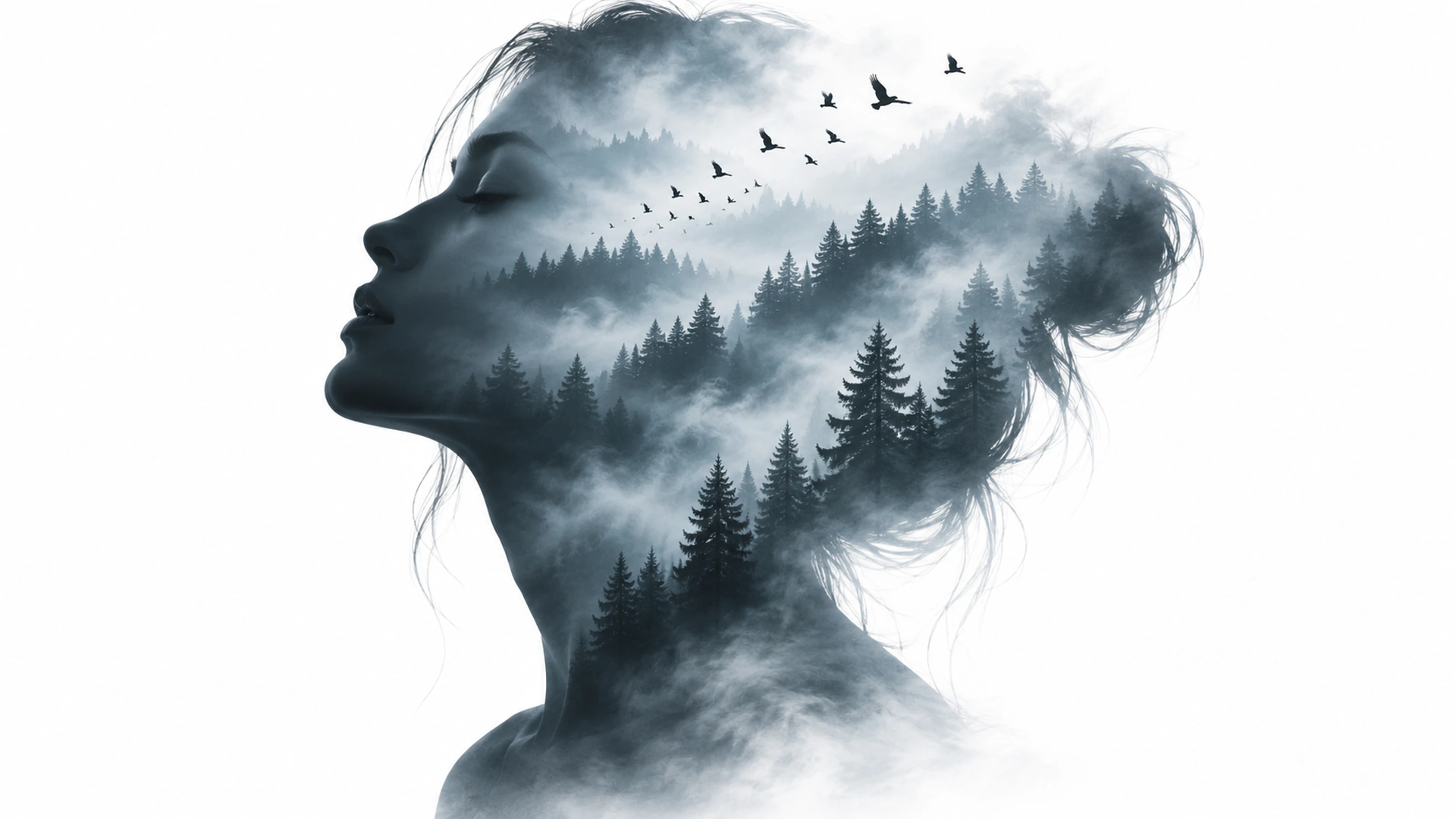
Today the look is everywhere, from film title sequences and album covers to posters and social media, usually made digitally with a 'screen' or 'lighten' blend. Its classic form is a dark silhouette, often a profile, filled with a landscape, a forest or a city.
Visual anatomy of double exposure
Usually a strong silhouette or profile against a light background.
A landscape, trees, a city, water or texture that shows inside the shape.
Light areas reveal, dark areas hide: the logic of screen or lighten modes.
Soft, fading boundaries where the two images melt into each other.
Often black and white or a single tint; colour versions use soft pastel or duotone.
Two ideas joined: a person and their memories, a place and its feeling.
How to recognize double exposure
- One image visible inside the shape of another.
- Translucent, ghostly overlap.
- A clean light background around a silhouette.
Where people get it wrong
Simply stacking two photos at 50% opacity makes a muddy image. A good double exposure has a clear hierarchy: one strong shape, one image that fills it, and plenty of light or white space so the overlap reads.
Words to describe double exposure
Precise words for the qualities above. Combine a few of them instead of naming the style or artist alone.
- double exposure portrait
- profile silhouette filled with forest
- city skyline inside a figure
- soft fading overlap
- white background
- black and white double exposure
- single colour tint
- dreamlike superimposition
- in-camera multiple exposure
- memory-like layering
A double exposure portrait: a woman's side profile in dark silhouette against a white background, filled with a misty pine forest and a flock of birds rising toward her forehead, the edges dissolving softly into white, black and white with a faint blue tint.
What to take from double exposure today
- Name the container shape: profile, figure, hand, animal.
- Name what fills it and where it fades.
- Say the colour treatment: black and white, single tint, duotone.
How to make a double exposure
In a digital camera
Many digital cameras have a multiple-exposure mode that combines two or more frames as you shoot, often with a choice of blend (additive, average, lighten). Shoot the silhouette first against a bright sky, then the texture.
On film
Expose the same frame twice without advancing the film, using a camera with a multiple-exposure lever, or shoot a whole roll, rewind it and shoot it again. Underexpose each shot by about a stop so the result is not too bright.
In Photoshop or another editor
- Place the portrait on the bottom layer and brighten its background to near white.
- Put the landscape or texture on a layer above and set it to Screen (or Lighten).
- Add a layer mask and paint away the texture where you want the face or edge to show clearly.
- Unify colour with a single tint or a black-and-white adjustment on top.
With Gen AI
Describe the container and the filling separately, and the background: 'double exposure, profile of a woman in black against white, her silhouette filled with a pine forest in mist, the trees fading out at her forehead, monochrome'. Generators tend to blur the two images together, so it often works better to generate each image and blend them yourself.
A short history
Double exposures are as old as photography's mistakes. In the 1860s William Mumler sold 'spirit photographs' made by double exposure as pictures of ghosts, and was taken to court for fraud. Early film-makers such as Georges Méliès used multiple exposure for tricks and dreams. In the 20th century it became an art tool for photographers from the Surrealists onward, and in 2014 the opening titles of the series True Detective made the silhouette-landscape double exposure famous again.
Ideas that work
A profile filled with the city or landscape they come from.
A wolf's head filled with a winter forest; a whale filled with the sea.
A face with a childhood house fading through it.
The same tree in summer and winter in one frame.
A potter's hands filled with clay texture or the workshop.
Street lights and traffic trails laid over a quiet portrait.
Two images, one metaphor
A double exposure is a visual metaphor in the grammatical sense: one thing seen as another. 'Her mind is a forest' is a sentence; the double exposure is that sentence made visible. The best ones choose a pairing that means something, not just two pretty pictures. Before you make one, write the metaphor down.
Questions about double exposure
How do you make a double exposure?
In camera, use a multiple-exposure mode or, on film, expose the same frame twice without advancing. Digitally, layer two images and use a Screen or Lighten blend, then mask the edges so one shape holds the other.
What works best as the base image?
A strong, simple silhouette against a bright plain background, often a profile portrait, because the second image shows through its dark areas.
Is double exposure the same as superimposition?
Superimposition is the general term for laying one image over another, common in film transitions. Double exposure usually means a still image where the overlap is designed as one composition.
What is double exposure in photography?
A technique that combines two exposures in a single image, so one picture shows through the other. It can be done on film, in a digital camera's multiple-exposure mode or by blending images in software.
How do you do double exposure in Photoshop?
Put the portrait on the bottom layer with a bright background, add the second image above, set its blend mode to Screen, then use a layer mask to control where each image shows.
Pick a person or an animal and a place that belongs to their story. Describe a double exposure that joins them: which shape, which landscape inside it, where the two melt, and what colour.
Sources and further reading
- Louis Kaplan, The Strange Case of William Mumler, Spirit Photographer, University of Minnesota Press, 2008.
- Adobe Photoshop Help: blending modes.
- Art of the Title: True Detective (2014), title sequence by Patrick Clair.